xyz
The picture below is a real map I made for The Dark Mod. Nearly everything you see in this picture is brushwork. In practice, the chances of any one brush being an exact copy of another are very slim. There are possible exceptions, like the cornerstones of the tower building. But even those are not guaranteed to be exactly the same, as the textures can have been aligned differently, and thus each of them may still have different UVs in at least one face.
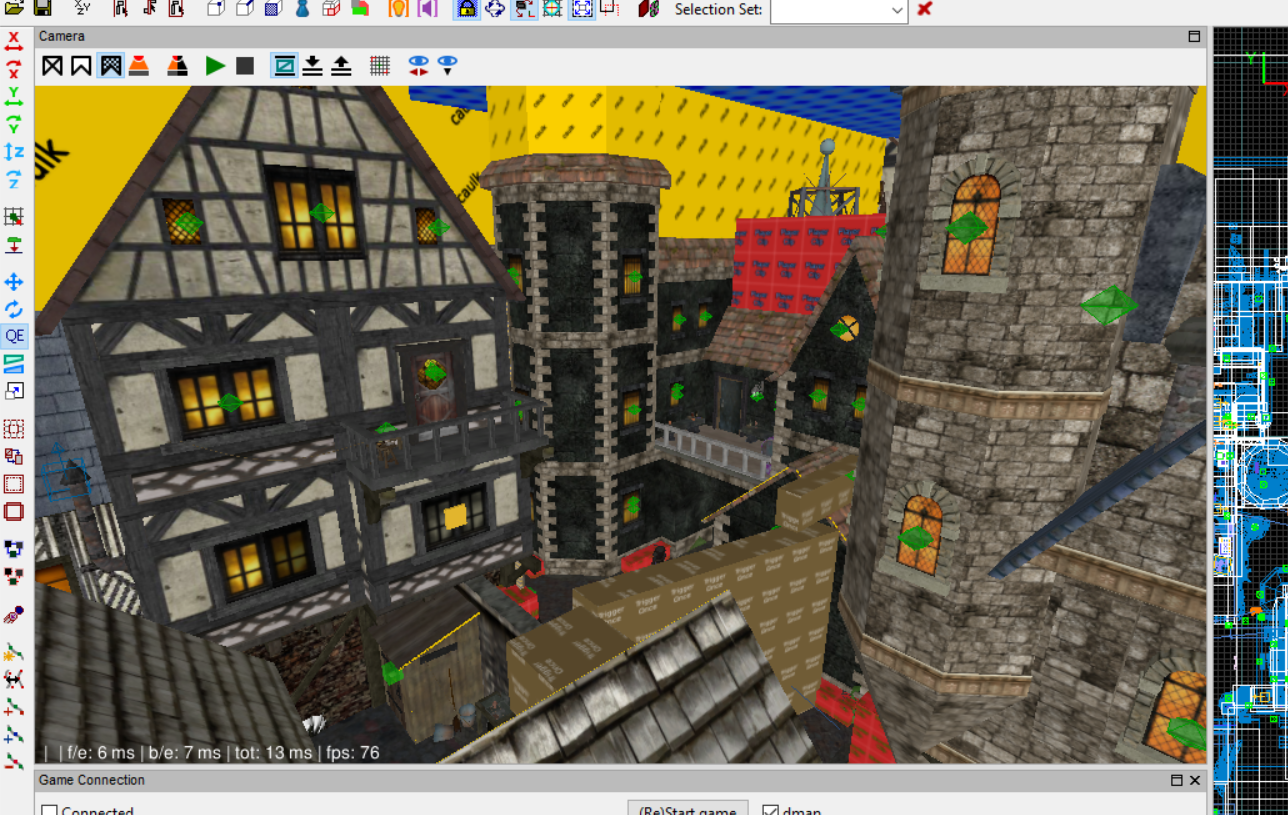
Each brush is created either individually by dragging the mouse, or by duplicating an existing brush. When you duplicate a brush, that's the only situation where you can easily know that this brush is an exact copy of another brush, without having to iterate through the entire list of brushes and comparing every vertex and UV coordinate. But then what usually happens is that the duplicate gets immediately modified in order to make up some different part of the geometry. Cases where you do use exact copies are very rare.
Even if you duplicate a brush to makes bars for a prison cell, for example, it's very likely that you'll still align each of their textures differently, just so they don't all look the exact same in game.
This is why brushes have to be unique. It's very rare that they are the same, and I don't suppose there's an efficient way to compare brushes to check that. So if this can be optimized, it has to be in different ways.
I tried looking at the source code from DarkRadiant and TrenchBroom, but so far I haven't been able to find how they handle these things. (I know TrenchBroom uses a "RenderBatch", but I'm still in the process of wrapping my head around how the whole thing works, and if it could be replicated in Godot.)
xyz You can use visibility range as described in that video to cull off far away objects and/or swap them with sprites.
The visibility range is supposed to be an option that users will be able to change to their own needs in the map editor, so I can't use that as an optimization. But then also, there's no telling how many brushes there might be in close proximity. In an editor like this, you can create brushes of any sizes in any place you want. You can easily have more than 1000 brushes within the visibility range. The picture above does have more than that (the tower alone is nearly 500).
xyz I still don't fully understand what a brush really is, but from the description @kuligs2 linked there is a distinction between editor map and runtime (compiled) map. It appears that brushes end up in (or constitute) a BPS tree at runtime, maybe even it the editor. This could significantly improve the performance via tree culling. So if you want comparable optimizations, you'll have to implement a BSP tree.
BSP trees are a map compiler thing that is unrelated to the editors. It's an algorithm in map compilers for quake/doom derived engines (including Source), that creates a tree representation of the map, so it can cull parts of it in game. It's basically a different way of doing occlusion culling in-game, and has nothing to do with the level editor. The editor doesn't care about any of that at all. The map files you save from the editors contain all the information about every single individual brush.
