kuligs2
As for the mixamo developer responded
https://github.com/scottpetrovic/mesh2motion-app/issues/18
He uses the quarran animation lib. CC0 So its safe.
Tomcat First of all, which browser does it run on? (First question.)
I use firefox, any modern browser should work.. not sure about edge and opera
Tomcat I'll need at least a few months just to figure out what these strange terms mean.
You need to install docker. On windows its just like any programm. Google it, docker desktop, agree to license, install, run.
Then donwload this repo .zip https://github.com/scottpetrovic/mesh2motion-app/archive/refs/heads/main.zip
Then extract it
Then open the folder, now the hackery part.
You need to open terminal/powershell/cmd into that directory
Then inside the repo direcotry you just open terminal/powershell and type docker compose up and it will run on http://localhost:3000
When you want to stop programm - CTRL + C inside that terminal with docker compose.
Tomcat I would like to upload my own animations.
The dev is looking for animator, so maybe you can talk over with him. I guess there is speciffic way to set up them animation so that they can be applied to any mesh, using their skeleton or something.. idk how it works.
EDIT:
Its funny but dev kinda does it ass backwards. TO run the application you have to clone repository, then run the docker which clones the same repository again from internet into the docker image.
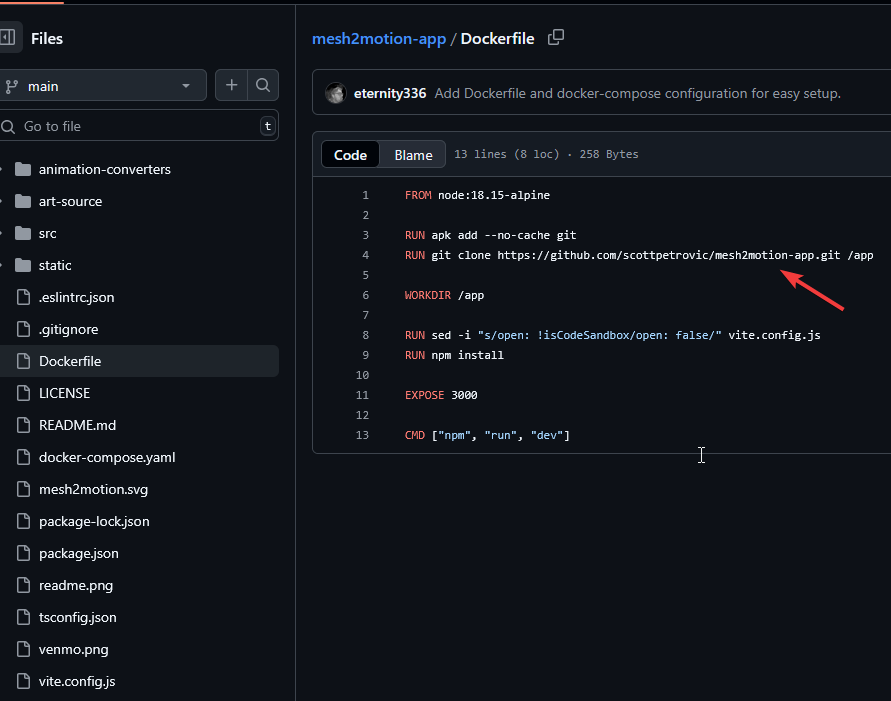
IDK why he does that, but for offline use if you cloned the repository via .zip just edit the Dockerfile
FROM node:18.15-alpine
RUN mkdir -p /app
WORKDIR /app
COPY ./ .
RUN sed -i "s/open: !isCodeSandbox/open: false/" vite.config.js
RUN npm install
EXPOSE 3000
CMD ["npm", "run", "dev"]


