Sup, I'm making a Rhythm Heaven style game where the player has to press buttons to the beat of the song. The animations and sounds all work correctly so far, but I'm having a little trouble figuring out how to calculate the input windows.
I've coded this in a way that seems a little unorthodox, but I really like it as nothing drifts and everything is synced up perfectly.
I use FL Studio as a beatmapper, creating multiple tracks for different objects, and using various keys for different animations, sounds, etc. So for an example, say if I wanted to make this game from Rhythm Heaven Groove, I'd make 3 tracks in total - one for the hoop spawning, another for the cpu characters, and another for the player. Each cpu action will be its own key, so let's make each of the jumps C, D, E and F.
Once I've mapped everything out I export it as a MIDI file, which I then convert it to JSON using a website. This JSON file contains all of my time and note values for each track. Here's a snippet of what a midi track looks like in JSON:
{
"startTime": 2.9268300000000003,
"duration": 5.528456666666667,
"length": 6,
"notes": [
{
"name": "C2",
"midi": 36,
"time": 2.9268300000000003,
"velocity": 0.7874015748031497,
"duration": 0.16260166666666676
},
{
"name": "C#2",
"midi": 37,
"time": 3.4146350000000005,
"velocity": 0.7874015748031497,
"duration": 0.16260166666666676
},
{
"name": "C3",
"midi": 48,
"time": 3.902440000000001,
"velocity": 0.7874015748031497,
"duration": 0.16260166666666676
},
{
"name": "C#3",
"midi": 49,
"time": 4.390245000000001,
"velocity": 0.7244094488188977,
"duration": 0.1626016666666663
},
{
"name": "C4",
"midi": 60,
"time": 4.878050000000001,
"velocity": 0.7874015748031497,
"duration": 0.1626016666666663
},
{
"name": "C#4",
"midi": 61,
"time": 5.365855000000001,
"velocity": 0.7874015748031497,
"duration": 0.1626016666666663
}
],
"id": 3,
"name": "camera_events",
"channelNumber": 0,
"isPercussion": false
},
I can then load it with this function I wrote:
for i in range(2, json.data["tracks"].size()):
var notes = json.data["tracks"][i]["notes"]
var times = []
var keys = []
# extract time values and keys for each note and store 'em in our array
for j in notes.size():
times.push_back(notes[j]["time"])
keys.push_back(notes[j]["name"])
# kinda stupid and a little lazy, but to prevent out of bounds errors just insert a really high value at the end
times.insert(times.size(), 9999)
var _name = json.data["tracks"][i]["name"]
# finally, build the dictionary for the track, and give it an index value so we can keep track of it
track_data[_name] = {
"note_times" : times,
"note_keys" : keys,
"note_index" : 0
}
This creates a dictionary containing all of the MIDI data I need.
What I can do now with it is process any events by checking if the audio time has exceeded our current target time.
func _process(_d):
# get_audio_time also adds the time since the last mix
if con.get_audio_time() >= track_data["cpu_jumps"]["note_times"][track_data["cpu_jumps"]["note_index"]]:
# get the key
match track_data["cpu_jumps"]["note_keys"][track_data["cpu_jumps"]["note_index"]]:
"C2":
cpu_0_anim.play("jump")
snd_pa.play()
"D2":
cpu_1_anim.play("jump")
snd_pi.play()
"E2":
cpu_2_anim.play("jump")
snd_pe.play()
"F2":
cpu_3_anim.play("jump")
snd_po.play()
# increment the index so we don't get stuck on this event
track_data["cpu_jumps"]["note_index"] += 1
Now to get into the real meat and potatoes, remember how I also made a player track containing all the notes where the player is supposed to jump? I've made a little diagram explaining my method:
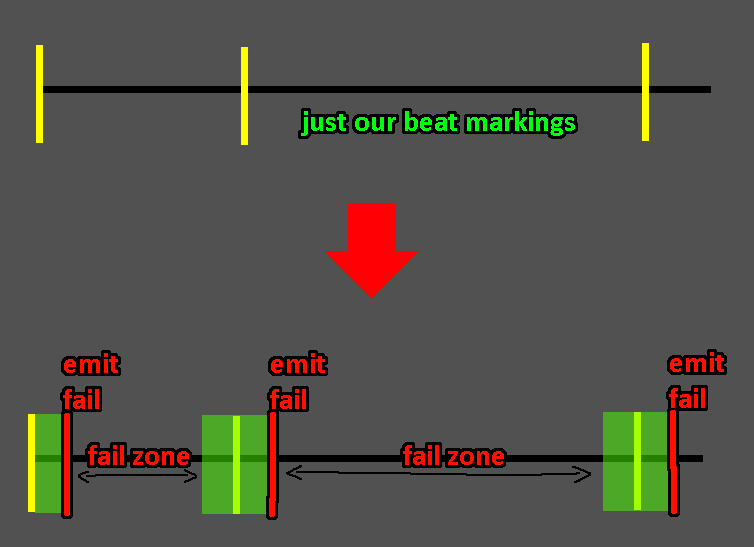
So I need to get each of those target values, add a little bit of a window, and then emit a fail signal once the audio position exceeds that window. If the player manages to press a key within that window, ignore this fail signal and move on to the next index. Any random inputs between windows will result in a fail.
My original idea was to just record the distance between the current audio position and the target and then determine fails based on a score:
func get_input_result():
con.recorded = con.get_audio_time()
var target_time = track_data["input"]["note_times"][track_data["input"]["note_index"]]
var result = (abs(target_time - con.recorded))
var score = (1.0 - result) * 100
return score
The only issue with this is that there was no extra space after the target note. Once the audio position hit the target note, the index changed to the next which caused every input to only work before the target note, not slightly after.
Like I said before, everything else works completely fine. I'm just not sure how to implement this particular solution correctly.
Any assistance would be much appreciated! 😃
