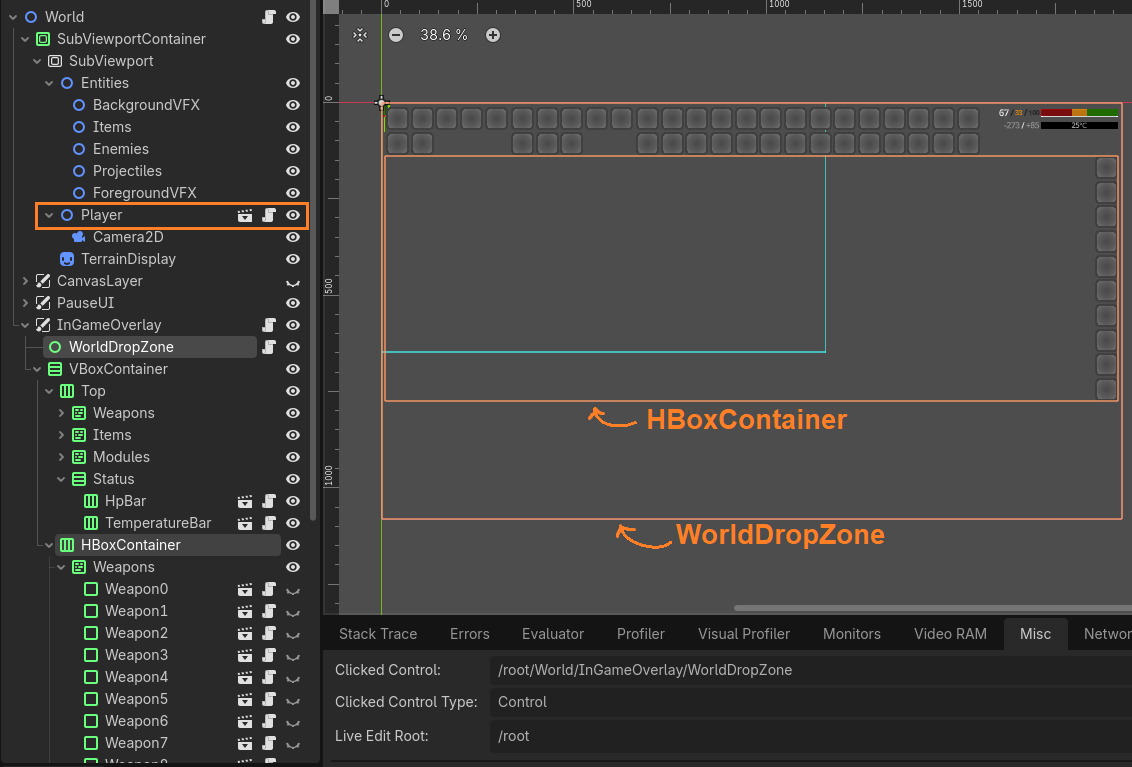
There are two Control nodes in my tree structure; namely "HBoxContainer" and "WorldDropZone".
"HBoxContainer" has mouse filter setting "Ignore".
"WorldDropZone" has mouse filter setting "Pass".
In Player nodes script file, I am trying to capture mouse click event like this:
public override void _UnhandledInput(InputEvent @event)
{
// Code reaches here if I press a key from keyboard
if (@event.IsActionPressed(INPUT_ACTION_STRING_ATTACK)) // `Godot.MouseButton.Left`
{
// The code never enter inside this if block
attackBufferTimer = ATTACK_BUFFER_TIME;
isValidAttackHold = true;
}
//...
}
If I use the debug panel to see the last clicked Control;
If I click inside "HBoxContainer", I always see its name.
If I click outside "HBoxContainer", I always see "WorldDropZone" (since it cover the entire screen).
The "Mouse > Behavior Recursive" settings of both Controls are "Inherited". If I change them to "Disable", the Player node can receive mouse clicks.
When I read the documentation article "Using InputEvent", it says the input events propagate from bottom to top in the tree. Since the mouse filter setting of these controls are not "Stop" and the Player node is higher in the tree, the input event must eventually reach the Player. But it doesn't.
You may think:
1) One of the chldren of "HBoxContainer" is capturing the click events.
Children of "HBoxContainer" does expand to entire parent area. The empty areas of "HBoxContainer" also block the mouse clicks.
2) There are some script files before the Player. They might be consuming the mouse clicks.
HpBar and TemperatureBar are simple passive bars (on top-left in the screenshot) for displaying HP of the player and ambient temperature. They don't read input. All of their child nodes have mouse filter setting "Ignore".
"WorldDropData" has only two methods; _CanDropData() and _DropData(). It is mouse filter setting is "Pass". The problem existed before I added this node; the mouse clicks were being blocked only when I click somewhere on "HBoxContainer".
"InGameOverlay" is indeed handling input, but only reading the TAB key.
3) There is some node in the tree that has mouse filter set to "Stop".
No. I have spent hours on this problem. I went through all of them. Even check the children of packed scenes. No control node has "Stop" setting and non of them expand the entire screen (other than WorldDropZone), but my mouse clicks never reach to Player wherever I click on the screen.
What am I missing here. I am really stuck. Where do I start solving this problem?
(Version 4.7.2 Mono)
