Had done some thinkin during shower:
If i use animation player, im limited to static animations and cant mix for instance hand movement animation for sword swing with leg animation running. For this you need animationmixer a.k.a. animation tree.
So Now im exploring using animation tree, where i would have movement node -> statemachine and fight node -> statemachine and then use blend node to mix them when needed based on code or whatever.
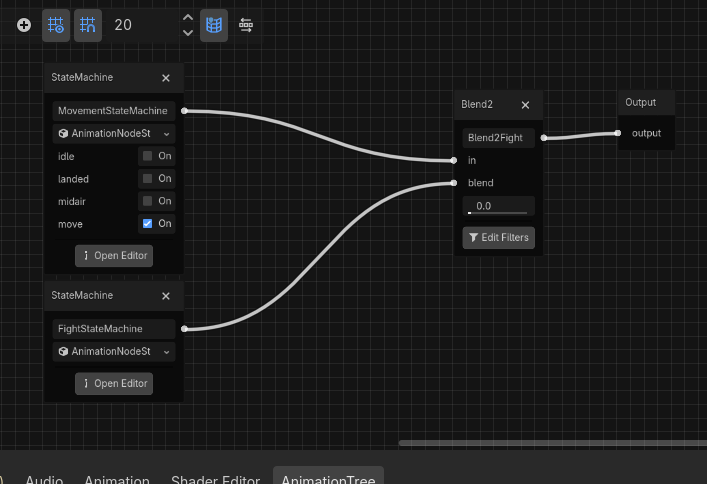
Alright this would work, but now i want to have the behavior of my animationplayer setup in animationtree.
Its not well documented on how, but i found you can get signals when state is finished like this:
var movement_playback: AnimationNodeStateMachinePlayback
func _ready() -> void:
movement_playback = animation_tree.get("parameters/MovementStateMachine/playback")
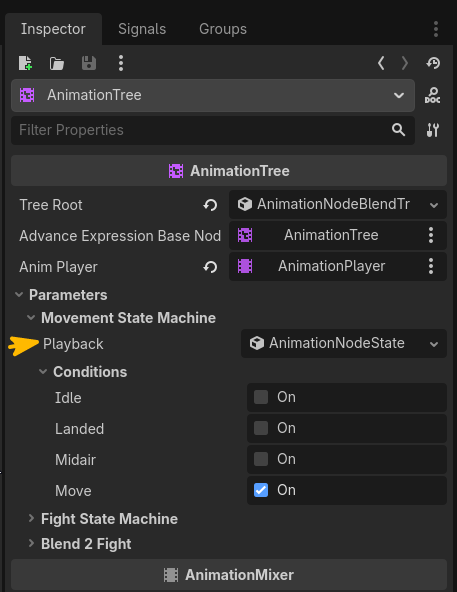
And then in my coded states i could use something like this:
extends StateInterface
class_name JumpLandedState
var character: Player
var is_blocking:bool = false
func enter(_prev_state: String = "")-> void:
character = state_machine.owner
character.movement_playback.state_finished.connect(on_state_finished) # <-------------------
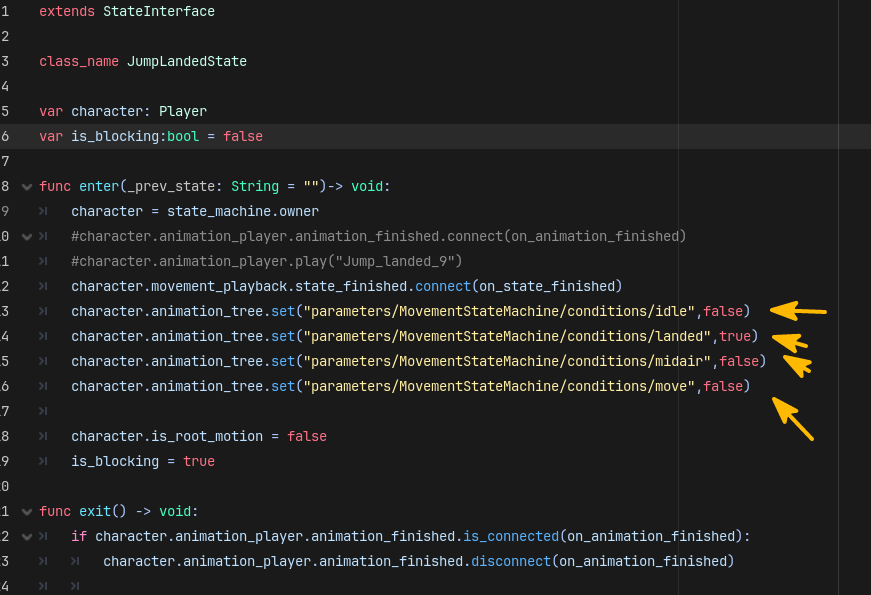
character.animation_tree.set("parameters/MovementStateMachine/conditions/idle",false)
character.animation_tree.set("parameters/MovementStateMachine/conditions/landed",true)
character.animation_tree.set("parameters/MovementStateMachine/conditions/midair",false)
character.animation_tree.set("parameters/MovementStateMachine/conditions/move",false)
character.is_root_motion = false
is_blocking = true
func physics_update(_delta: float) -> void:
if not character.is_on_floor():
state_machine.change_state("Jump_midair_90")
return
character.velocity = (character.animation_tree.get_root_motion_rotation_accumulator().inverse() * character.get_quaternion()) * character.animation_tree.get_root_motion_position() / _delta
character.move_and_slide()
if not is_blocking:
_decide_next_state()
func on_state_finished(_animation_name):
if _animation_name == "Jump_landed_9":
print("Landed state finished: ",_animation_name)
character.movement_playback.state_finished.disconnect(on_state_finished)
is_blocking = false
And then tried out walking routine and it seems that it dont loose the velocity -> no more 0.0 frames
State: idle Velocity: 0.000 RM: (0.0, 0.0, 0.0)
State: idle Velocity: 0.000 RM: (0.0, 0.0, 0.0)
State: idle Velocity: 0.000 RM: (0.0, 0.0, 0.0)
State: idle Velocity: 0.000 RM: (0.0, 0.0, 0.0)
Changing state to: walk_start
State: walk_start Velocity: 0.000 RM: (0.0, 0.0, 0.0)
State: walk_start Velocity: 0.000 RM: (0.0, 0.0, 0.0)
State: walk_start Velocity: 0.000 RM: (0.0, 0.0, 0.0)
State: walk_start Velocity: 0.418 RM: (0.0, 0.0, 0.0)
State: walk_start Velocity: 0.627 RM: (0.0, 0.0, 0.0)
State: walk_start Velocity: 0.836 RM: (0.0, 0.0, 0.0)
State: walk_start Velocity: 1.046 RM: (0.0, 0.0, 0.0)
State: walk_start Velocity: 1.255 RM: (0.0, 0.0, 0.0)
State: walk_start Velocity: 1.255 RM: (0.0, 0.0, 0.0)
State: walk_start Velocity: 1.255 RM: (0.0, 0.0, 0.0)
State: walk_start Velocity: 1.255 RM: (0.0, 0.0, 0.0)
State: walk_start Velocity: 1.255 RM: (0.0, 0.0, 0.0)
State: walk_start Velocity: 1.255 RM: (0.0, 0.0, 0.0)
State: walk_start Velocity: 1.255 RM: (0.0, 0.0, 0.0)
State: walk_start Velocity: 1.255 RM: (0.0, 0.0, 0.0)
State: walk_start Velocity: 1.255 RM: (0.0, 0.0, 0.0)
State: walk_start Velocity: 1.255 RM: (0.0, 0.0, 0.0)
State: walk_start Velocity: 1.255 RM: (0.0, 0.0, 0.0)
State: walk_start Velocity: 1.255 RM: (0.0, 0.0, 0.0)
State: walk_start Velocity: 1.255 RM: (0.0, 0.0, 0.0)
State: walk_start Velocity: 1.255 RM: (0.0, 0.0, 0.0)
State: walk_start Velocity: 1.255 RM: (0.0, 0.0, 0.0)
State: walk_start Velocity: 1.255 RM: (0.0, 0.0, 0.0)
State: walk_start Velocity: 1.255 RM: (0.0, 0.0, 0.0)
State: walk_start Velocity: 1.255 RM: (0.0, 0.0, 0.0)
State: walk_start Velocity: 1.255 RM: (0.0, 0.0, 0.0)
State: walk_start Velocity: 1.255 RM: (0.0, 0.0, 0.0)
State: walk_start Velocity: 1.255 RM: (0.0, 0.0, 0.0)
State: walk_start Velocity: 1.255 RM: (0.0, 0.0, 0.0)
State: walk_start Velocity: 1.255 RM: (0.0, 0.0, 0.0)
State: walk_start Velocity: 1.255 RM: (0.0, 0.0, 0.0)
State: walk_start Velocity: 1.255 RM: (0.0, 0.0, 0.0)
State: walk_start Velocity: 1.255 RM: (0.0, 0.0, 0.0)
State: walk_start Velocity: 1.255 RM: (0.0, 0.0, 0.0)
State: walk_start Velocity: 1.255 RM: (0.0, 0.0, 0.0)
State: walk_start Velocity: 1.255 RM: (0.0, 0.0, 0.0)
State: walk_start Velocity: 1.255 RM: (0.0, 0.0, 0.0)
State: walk_start Velocity: 1.255 RM: (0.0, 0.0, 0.0)
State: walk_start Velocity: 1.255 RM: (0.0, 0.0, 0.0)
State: walk_start Velocity: 1.255 RM: (0.0, 0.0, 0.0)
State: walk_start Velocity: 1.255 RM: (0.0, 0.0, 0.0)
State: walk_start Velocity: 1.255 RM: (0.0, 0.0, 0.0)
State: walk_start Velocity: 1.255 RM: (0.0, 0.0, 0.0)
State: walk_start Velocity: 1.255 RM: (0.0, 0.0, 0.0)
State: walk_start Velocity: 1.255 RM: (0.0, 0.0, 0.0)
State: walk_start Velocity: 1.255 RM: (0.0, 0.0, 0.0)
State: walk_start Velocity: 1.255 RM: (0.0, 0.0, 0.0)
State: walk_start Velocity: 1.255 RM: (0.0, 0.0, 0.0)
State: walk_start Velocity: 1.255 RM: (0.0, 0.0, 0.0)
State: walk_start Velocity: 1.255 RM: (0.0, 0.0, 0.0)
State: walk_start Velocity: 1.255 RM: (0.0, 0.0, 0.0)
State: walk_start Velocity: 1.255 RM: (0.0, 0.0, 0.0)
State: walk_start Velocity: 1.255 RM: (0.0, 0.0, 0.0)
State: walk_start Velocity: 1.255 RM: (0.0, 0.0, 0.0)
State: walk_start Velocity: 1.255 RM: (0.0, 0.0, 0.0)
State: walk_start Velocity: 1.255 RM: (0.0, 0.0, 0.0)
State: walk_start Velocity: 1.255 RM: (0.0, 0.0, 0.0)
State: walk_start Velocity: 1.255 RM: (0.0, 0.0, 0.0)
State: walk_start Velocity: 1.255 RM: (0.0, 0.0, 0.0)
State: walk_start Velocity: 1.255 RM: (0.0, 0.0, 0.0)
State: walk_start Velocity: 1.255 RM: (0.0, 0.0, 0.0)
State: walk_start Velocity: 1.255 RM: (0.0, 0.0, 0.0)
State: walk_start Velocity: 1.255 RM: (0.0, 0.0, 0.0)
State: walk_start Velocity: 1.255 RM: (0.0, 0.0, 0.0)
State: walk_start Velocity: 1.255 RM: (0.0, 0.0, 0.0)
State: walk_start Velocity: 1.255 RM: (0.0, 0.0, 0.0)
State: walk_start Velocity: 1.255 RM: (0.0, 0.0, 0.0)
State: walk_start Velocity: 1.255 RM: (0.0, 0.0, 0.0)
State: walk_start Velocity: 1.255 RM: (0.0, 0.0, 0.0)
State: walk_start Velocity: 1.255 RM: (0.0, 0.0, 0.0)
State: walk_start Velocity: 1.255 RM: (0.0, 0.0, 0.0)
State: walk_start Velocity: 1.255 RM: (0.0, 0.0, 0.0)
State: walk_start Velocity: 1.255 RM: (0.0, 0.0, 0.0)
State: walk_start Velocity: 1.255 RM: (0.0, 0.0, 0.0)
State: walk_start Velocity: 1.255 RM: (0.0, 0.0, 0.0)
State: walk_start Velocity: 1.255 RM: (0.0, 0.0, 0.0)
State: walk_start Velocity: 1.255 RM: (0.0, 0.0, 0.0)
State: walk_start Velocity: 1.255 RM: (0.0, 0.0, 0.0)
State: walk_start Velocity: 1.255 RM: (0.0, 0.0, 0.0)
State: walk_start Velocity: 1.255 RM: (0.0, 0.0, 0.0)
Unblocked state
Changing state to: walk
State: walk Velocity: 1.255 RM: (0.0, 0.0, 0.0)
State: walk Velocity: 1.255 RM: (0.0, 0.0, 0.0)
State: walk Velocity: 1.255 RM: (0.0, 0.0, 0.0)
State: walk Velocity: 1.255 RM: (0.0, 0.0, 0.0)
State: walk Velocity: 1.255 RM: (0.0, 0.0, 0.0)
State: walk Velocity: 1.046 RM: (0.0, 0.0, 0.0)
State: walk Velocity: 1.230 RM: (0.0, 0.0, 0.0)
State: walk Velocity: 1.217 RM: (0.0, 0.0, 0.0)
State: walk Velocity: 1.204 RM: (0.0, 0.0, 0.0)
State: walk Velocity: 1.192 RM: (0.0, 0.0, 0.0)
State: walk Velocity: 1.179 RM: (0.0, 0.0, 0.0)
State: walk Velocity: 1.179 RM: (0.0, 0.0, 0.0)
State: walk Velocity: 1.179 RM: (0.0, 0.0, 0.0)
State: walk Velocity: 1.179 RM: (0.0, 0.0, 0.0)
State: walk Velocity: 1.179 RM: (0.0, 0.0, 0.0)
State: walk Velocity: 1.179 RM: (0.0, 0.0, 0.0)
State: walk Velocity: 1.179 RM: (0.0, 0.0, 0.0)
State: walk Velocity: 1.179 RM: (0.0, 0.0, 0.0)
State: walk Velocity: 1.179 RM: (0.0, 0.0, 0.0)
State: walk Velocity: 1.179 RM: (0.0, 0.0, 0.0)
But it oddly dips below the next animation velocity.. both animations have linear root motion translation with 0.1 blending between animations
State: walk Velocity: 1.046 RM: (0.0, 0.0, 0.0)
With having blending - 0.1 on the switch from walk_start to walk animation introduces slight misstep in feet animation and looks clunky, removing the blending - 0.0 eliminates any desync and its smooth. Because both animations start and end on the same frame (-1) so it dont need any blending.
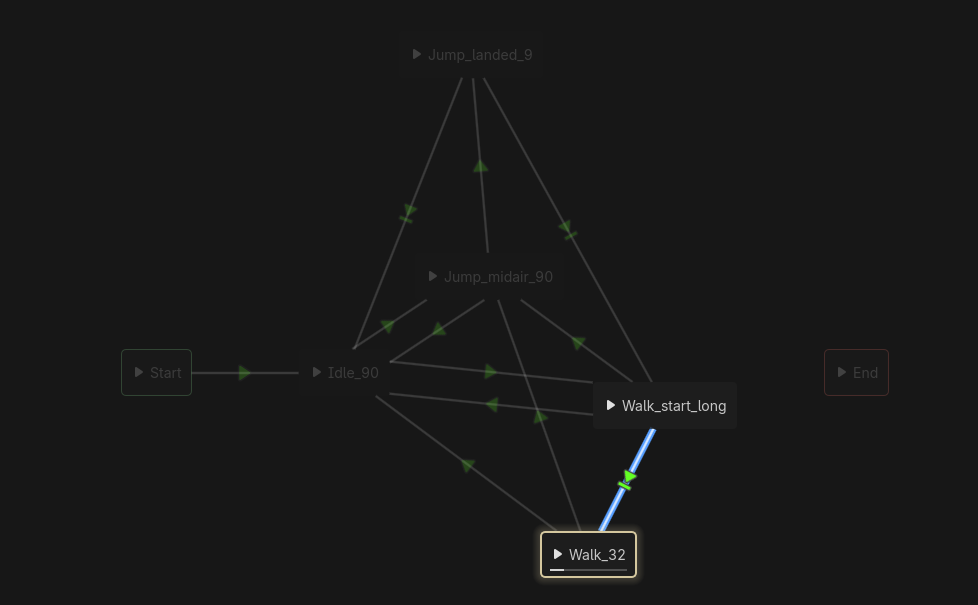
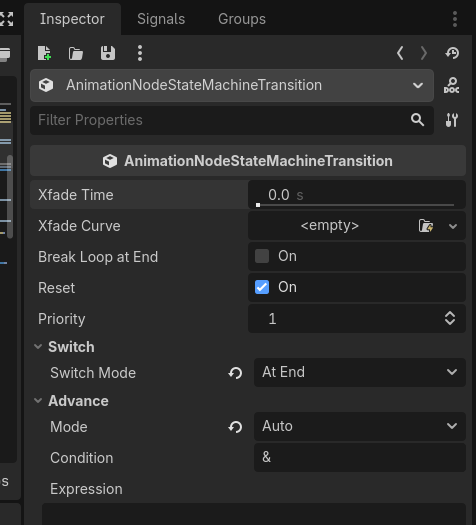
TLDR:
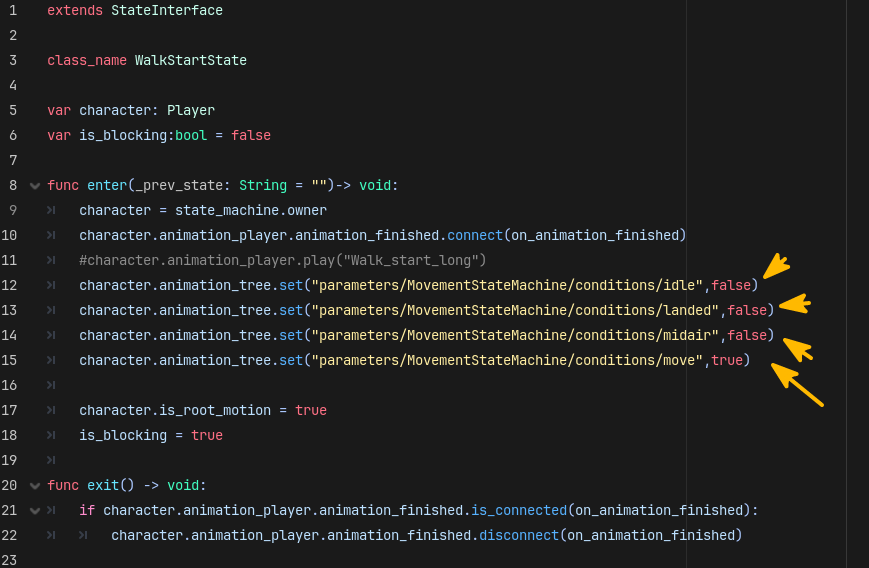
Seems like animationtree is usable in my case. Bummer is that for each movement state i have to define the switch states like:
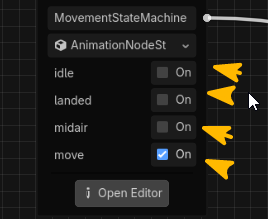
Is there a better way to "toggle" switch states, or is it evil we have to live with?


