Hello! I'm returning to Godot after using MonoGame for a little bit, so I was trying to setup my game to be "pixel perfect".
Specifically, I want each of the pixels in my sprites to match up with the pixels on the user's screen (or more likely, be scaled by an integer to fit their screens. However, it's always been very slightly off. What's more odd is that it becomes less and less noticeable the higher the resolution gets.
With the window sized to the viewport's native size for my game, it looks like this and the issue is very obvious.
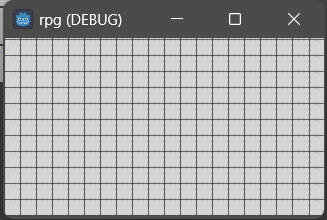
(cropped screen capture)
But at a higher scale (1920-1080, my computer is 1920-1200), the issue still exists but is much harder to see (another fullscreen capture)
If you zoom way into the above image, it looks like this  , and you can see that there are singular off pixels, which doesn't even make sense given that the viewport should be scaled (one pixel off should be impossible).
Needless to say, I'm quite confused! Here are all my relevant settings, if anyone could help it'd be much appreciated!
; Engine configuration file.
; It's best edited using the editor UI and not directly,
; since the parameters that go here are not all obvious.
;
; Format:
; [section] ; section goes between []
; param=value ; assign values to parameters
config_version=5
[application]
config/name="rpg"
run/main_scene="res://Main.tscn"
config/features=PackedStringArray("4.3", "C#", "GL Compatibility")
config/icon="res://icon.svg"
[display]
window/size/viewport_width=320
window/size/viewport_height=180
window/size/window_width_override=320
window/size/window_height_override=180
window/stretch/mode="viewport"
window/stretch/scale_mode="integer"
[dotnet]
project/assembly_name="rpg"
[rendering]
textures/canvas_textures/default_texture_filter=0
2d/snap/snap_2d_transforms_to_pixel=true

