Here is the project-pitch: I want to create a sokoban-style box pushing game. That means that the player moves on a grid, and so do the boxes (maybe some other entities too). I figured the best way to do this is to create a TileBasedMovement component. The code is pretty much this:
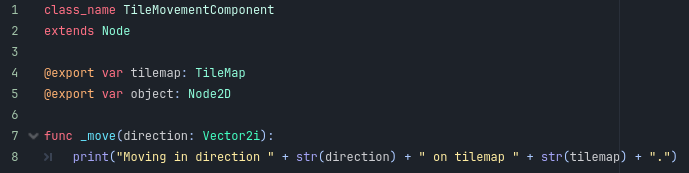
This has two exported variables: an object to move, and a tilemap to get the tile size (and collisions, etc.).

The object to move is easy to set up. The player scene looks like this:

The Player node can be sent to the object field.
Here is the problem: I have no idea how to set the exported "tilemap" value to the actual tilemap. The actual level scene looks something like this:

However, there is no way to modify the player's TileBasedMovement component from here. Is there an option I can turn on to edit it which I haven't heard about before?
Some things I have tried before:
1) Setting up the tilemap with a Unique Name still does not make it assignable with the player scene
2) Setting up the player with an exported variable, then using setters to modify the tilemap's variable does not work. At the point of the exported value being set for the player, the component does not exist yet.
3) Similar to the second solution, I could mark the player script with the "tool" macro. This way I could set it such that whenever I edit the player's tilemap value in the editor, it also edits the component's tilemap value. However, this seems like a bit of an overkill for what I'm trying to achieve, and I'd have to add a bunch of extra code in the player script to make sure it's not being run inside the editor.
4) Probably the easiest thing would be to have the component's move function take in a tilemap as an argument instead of exporting it. Then the player can call it with its own exported tilemap value. This means that this value gets passed around quite a lot, which leads to extra code.
I think the ideal solution would be something like number 3, but it really does seem like an overkill for this situation. Is there any other approach I haven't heard about?
Edit: some new things I've learned:
5) There is an editable children option in the editor for instanciated scene, which solves the current problem pretty neatly, but there are a few cases that are still not covered.
If the player scene had multiple components (TileBasedMovement, TileBasedPathfinding, TileModifyer, etc...) then I'd have to set each of these individually to the same tileMap node, which is a lot of work. It seems like the tool macro might be the best solution here (but I'm still looking for any other approaches)
If I have 10 or 20 boxes in the game scene (all needing a tilemap), it's very bothersome to set it one-by-one. Is there something like a global value or a custom resource that I can create, set the boxes' tilemap to be that resource and then change what that resource actually means within a script?
